Progress
Progress notes
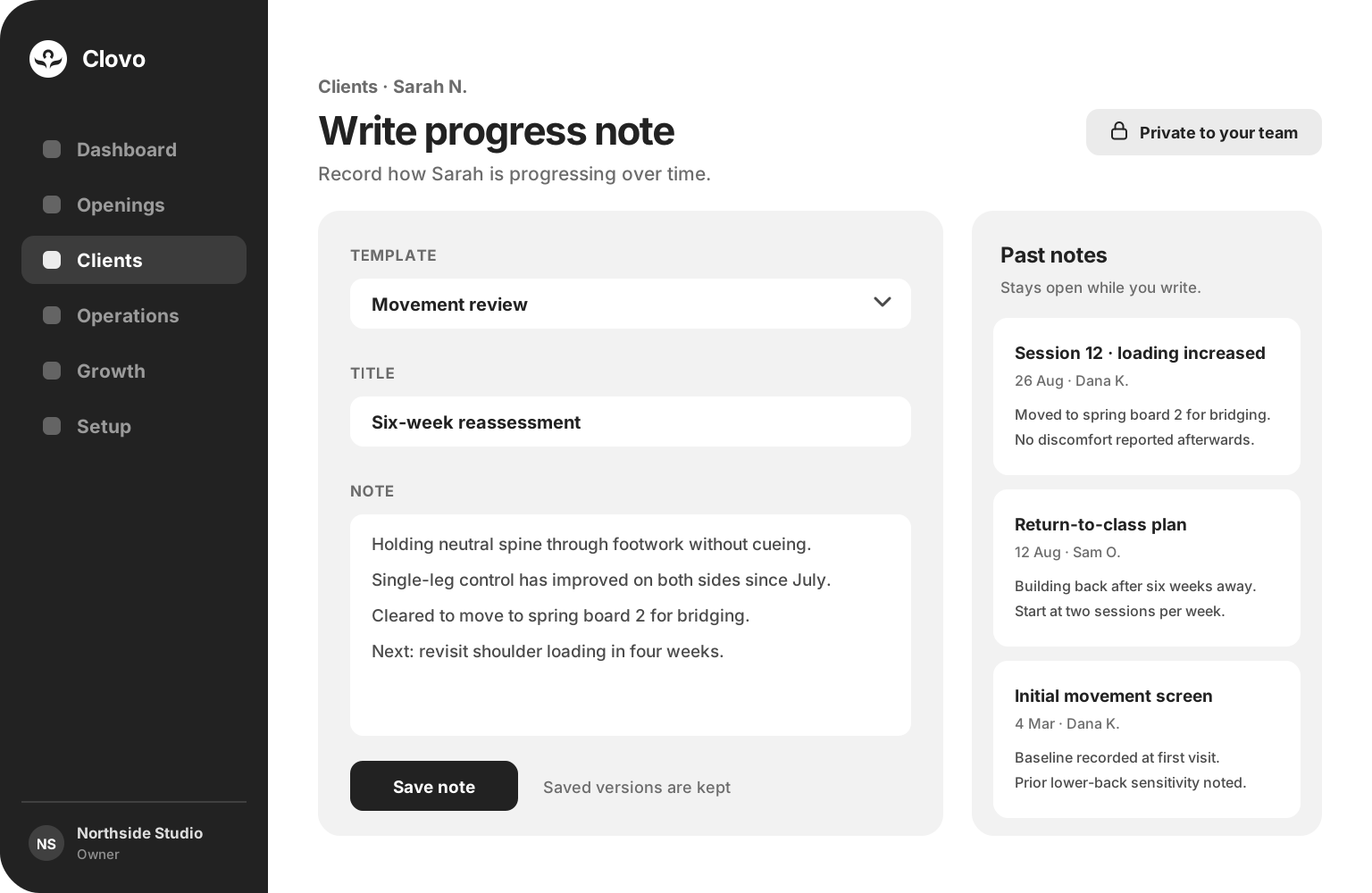
Record how a client is changing over time in a focused writing view that keeps their earlier notes beside you.

 Branded Booking Apps
Let clients book, pay and join waitlists in your branded app.
Branded Booking Apps
Let clients book, pay and join waitlists in your branded app.
 Studio Management Dashboard
Manage schedules, clients, payments and more in one place.
Studio Management Dashboard
Manage schedules, clients, payments and more in one place.
 Landing Pages
Showcase classes and pricing on your own .clovo.app page.
Landing Pages
Showcase classes and pricing on your own .clovo.app page.
 Member Shop
Sell studio merchandise through the app your members use.
Member Shop
Sell studio merchandise through the app your members use.
 Client Records
Keep progress notes, forms and agreements securely together.
Client Records
Keep progress notes, forms and agreements securely together.
 Integrated Admin App
Manage your studio from the Clovo app, wherever you are.
Integrated Admin App
Manage your studio from the Clovo app, wherever you are.
 Website Add-ons
Add live schedules and ways to buy to your existing website.
Website Add-ons
Add live schedules and ways to buy to your existing website.
 Retention
Spot clients drifting away and reconnect before they leave.
Retention
Spot clients drifting away and reconnect before they leave.
 Clovo Kiosk
Turn a spare iPad into self check-in and a studio showcase.
Clovo Kiosk
Turn a spare iPad into self check-in and a studio showcase.
 Growth
Grow your studio with reporting, offers, reviews and referrals.
Growth
Grow your studio with reporting, offers, reviews and referrals.
Private to your team, and ready before the next session begins.
Records built into your booking platform beat anything kept beside it.
Progress
Record how a client is changing over time in a focused writing view that keeps their earlier notes beside you.
Consistency
Reuse the structure your team trusts so records stay comparable from one reassessment to the next.
Audit trail
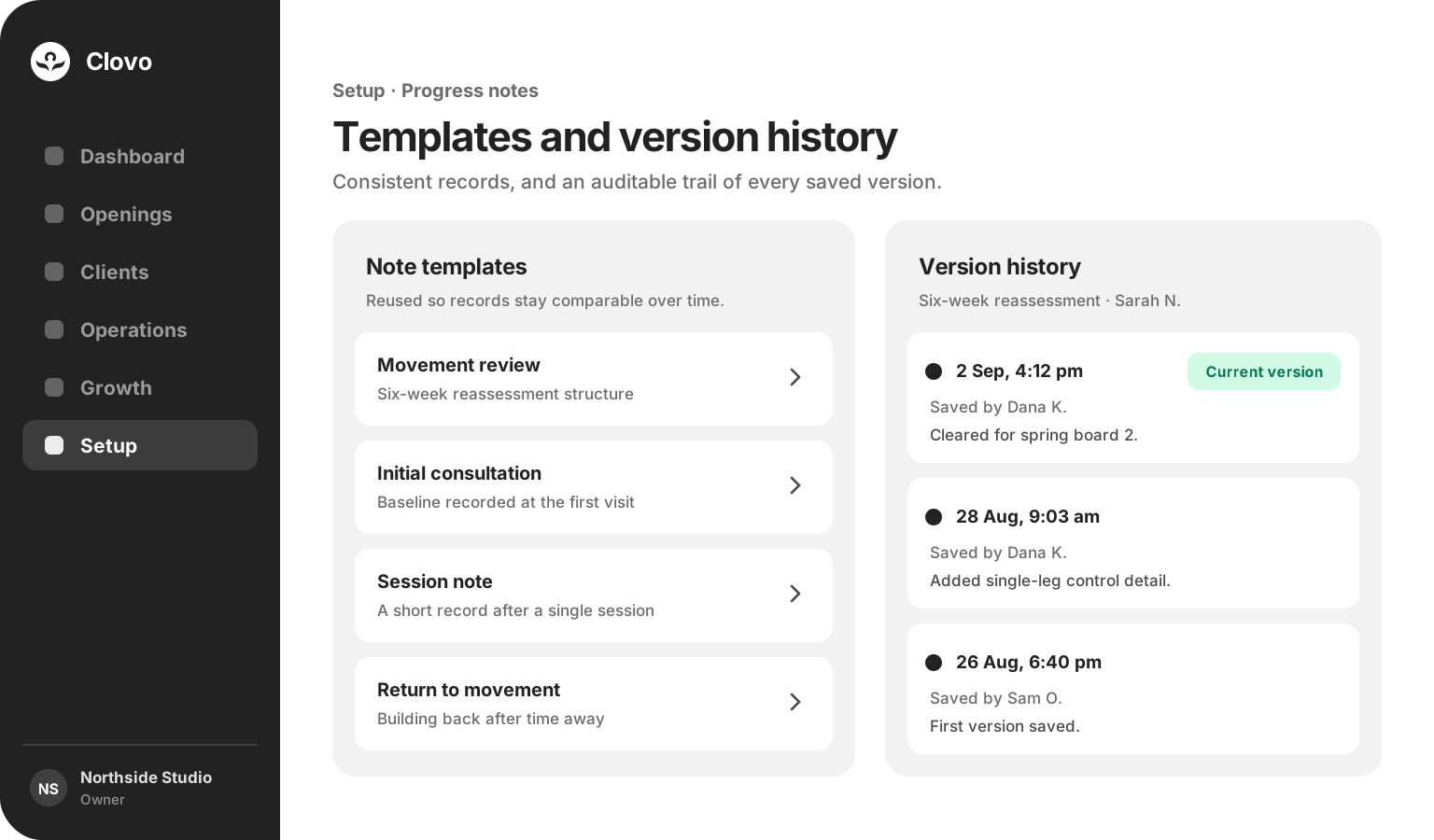
Every saved version is kept with its author and time, so a record can always be accounted for.
Context
Build forms for the questions that matter, then send them automatically to clients or complete them with your team.
Preparation
Make selected forms a condition of booking, so your team is never guessing at the start of a class.
Privacy
Notes and answers are encrypted at rest, shown only in authorised views, and never displayed to the client.
Progress notes
The writing view keeps a client’s earlier observations open beside the note being added, so your team works from the record rather than from memory. Notes are private to your team, encrypted at rest and never shown to the client.
Templates and version history
Templates give a repeated assessment the same shape, so progress is easy to compare months apart. Every save creates a new version carrying its author and time, leaving an auditable trail behind the note your team is reading today.

Better preparation
When the history is already there, the first few minutes of a session go to the person rather than to catching up. Your team can see what was worked on last time, what was agreed, and what to revisit today.
Form Builder
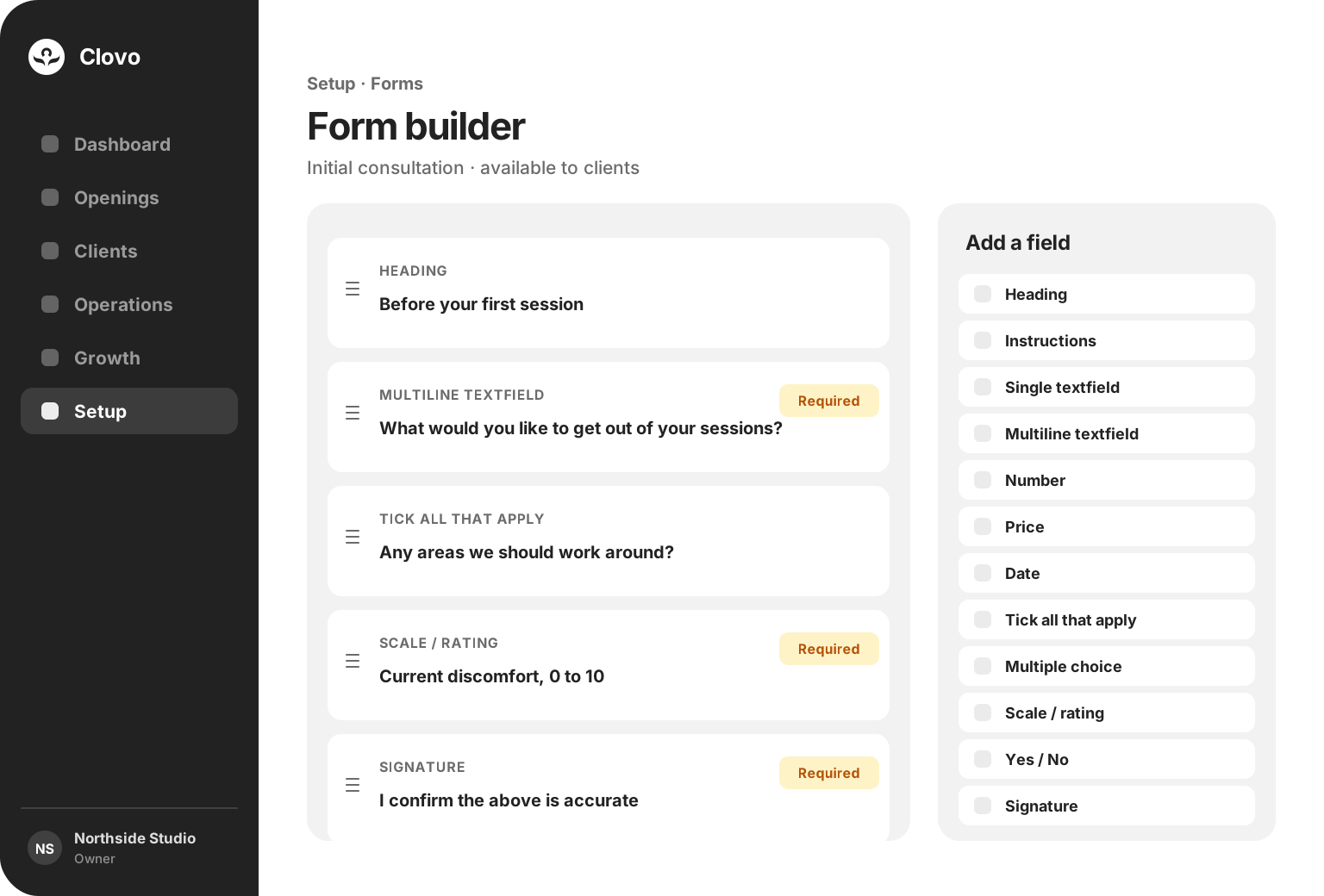
Combine headings, instructions, written answers, numbers, prices, dates, choices, ratings, yes or no questions and signatures, then mark the questions that must be answered. Self-service forms can be sent automatically to clients or requested manually, while staff-only forms are completed by your team.
Sent, completed, kept
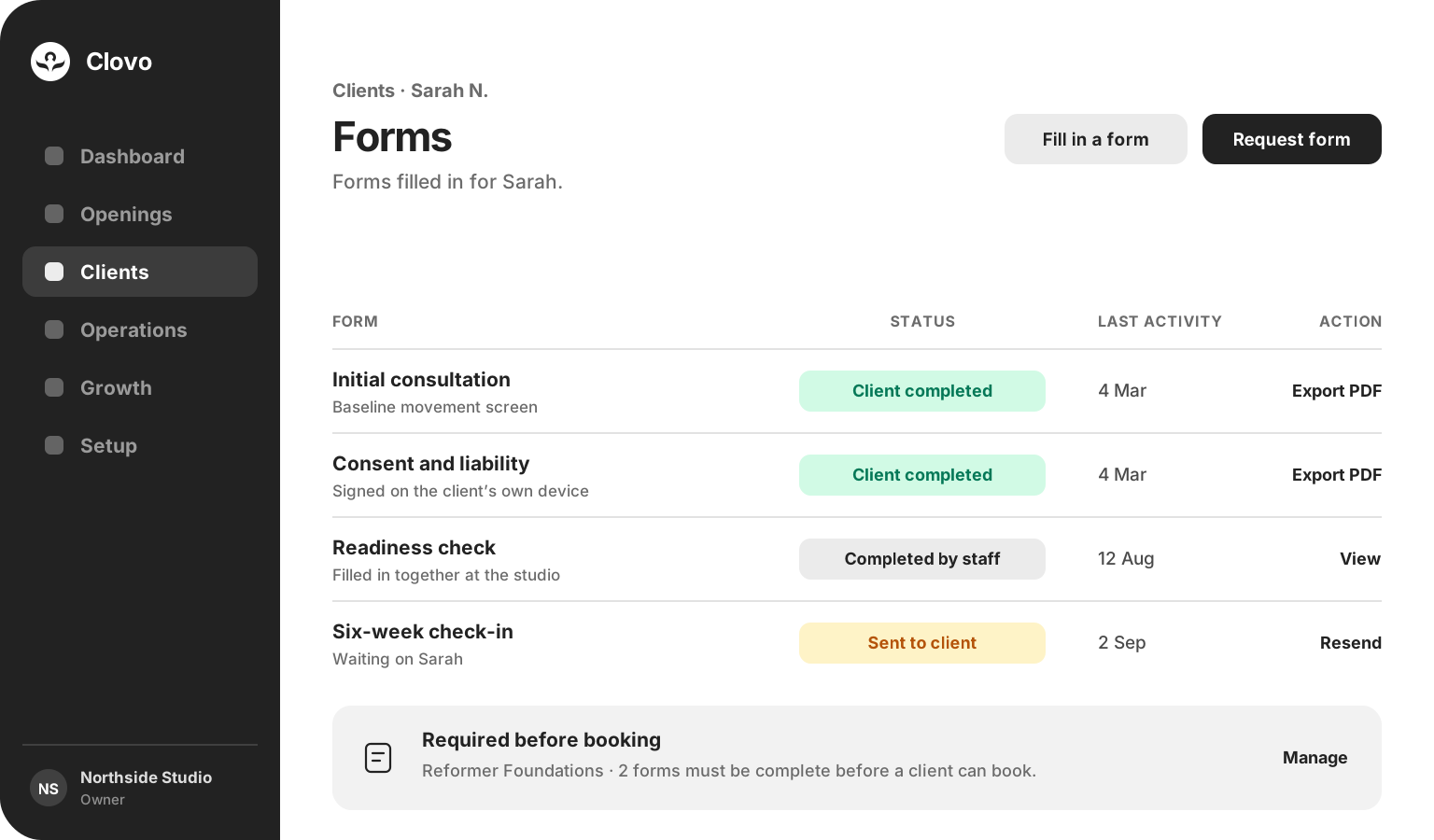
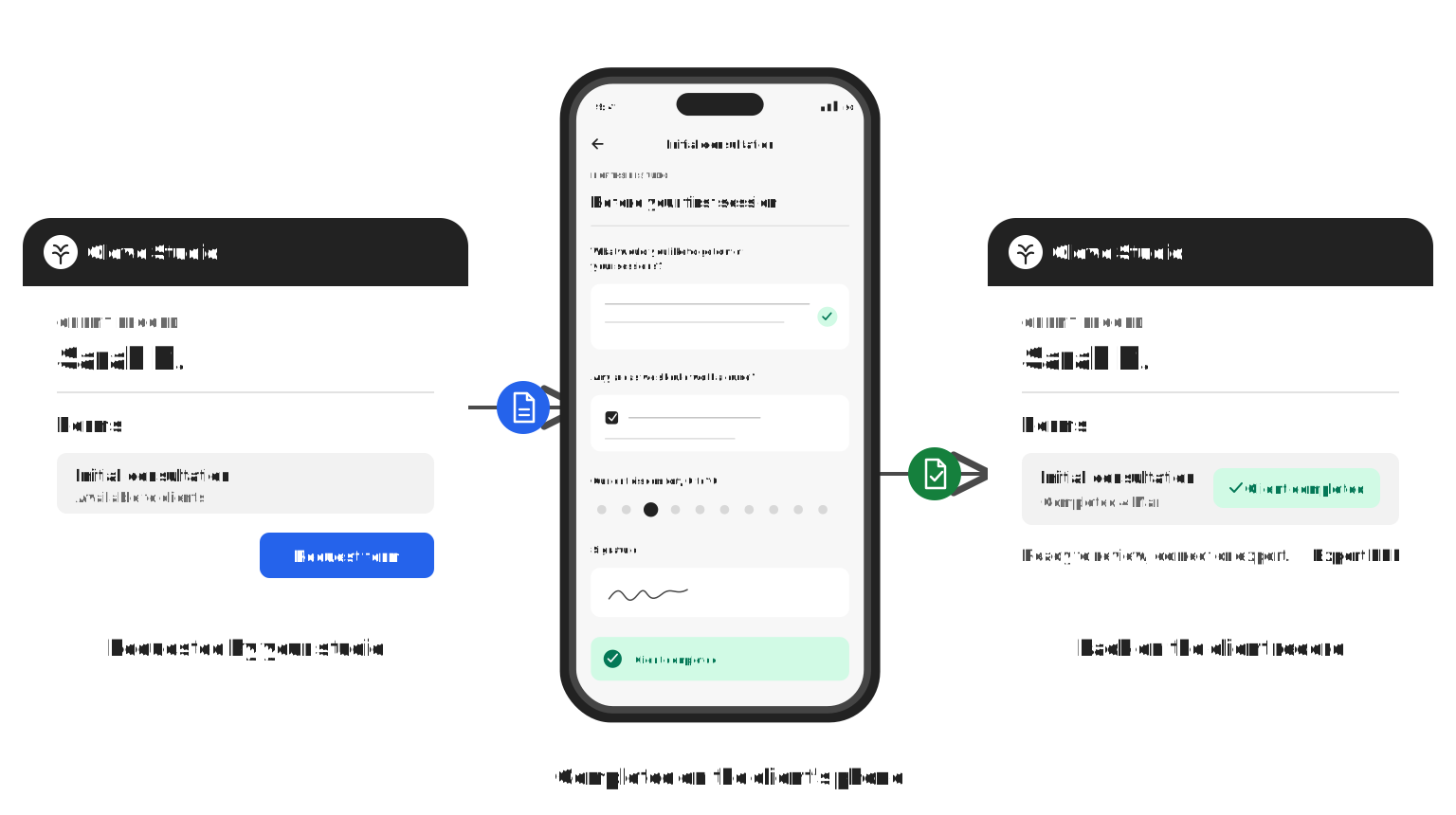
Send a self-service form automatically to a client, or request one yourself when a team member is guiding the conversation. Clients complete forms on their own device, while the outstanding request stays visible to your team, and completed answers settle on the client record ready to review, correct or export as a PDF.
One clear round trip
Configure a form to send automatically to a client, or request one from their client record when it matters. When they finish, the answers return to the client record ready for your team to review or export.
Encrypted at rest, shown only in authorised views, and never seen by the client.
Common questions
No. Progress notes are private to your team and are never shown to the client. Completed form answers are also kept out of client-facing views, and both are encrypted at rest.
Nothing is lost. Each save creates a new version alongside the ones before it, with the staff member and the time recorded, so the history of a note stays auditable.
Yes. Choose one or more forms for selected classes and Clovo guides anyone with an outstanding form to complete it before continuing. Each required form only needs to be completed once, and staff can still add a client when an exception is appropriate.
Yes. Self-service forms can be sent automatically to clients, or your team can request one manually from the client record. Completed answers return to the record ready for review, correction or export.
Yes. Staff can review a response, correct it if something needs putting right, and export it as a PDF when a copy is needed.
No. Forms work across Clovo, so a client answers in the same place they already book and pay, and your team keeps a clear view of what is still outstanding.
Yours to set
Choose the forms that matter for each class, and configure client forms to send automatically when needed. Your studio sets what is required, and Clovo takes care of asking.
Client Records is available now

Bring progress notes, forms and agreements together on one secure record inside Clovo.
Launch your studio today with no monthly fee — you only pay when your members pay you. Set up for free, with no card required.
Start free today