


Introducing Contracts

Memberships are one of the most useful products a studio can sell because they turn a good class into a reliable habit. They also come with a responsibility: members should understand what they are agreeing to, how long a commitment lasts, and what happens when they decide it is time to leave.
Contracts is Clovo’s new membership layer for making that agreement explicit. Studios can attach their own contract wording to a membership plan, choose a minimum period and cancellation notice, and decide whether a member accepts with a checkbox or also provides a hand-drawn signature. The same contract travels through the Dashboard, web purchase flows and the Clovo apps, so the member experience does not change depending on where the sale began.
A membership contract has three separate ideas
Contracts are easier to operate when the legal wording and the commercial rules are not mixed into one opaque setting. Clovo keeps three things distinct:
- The agreement is the text a member reads and accepts before payment.
- The minimum period is how many billing periods a renewing membership must begin before it can be cancelled.
- The notice period is how many further billing periods a member serves after they cancel.
That separation matters. A studio might want a written agreement with no minimum term. Another might sell a 12-month membership and ask for one month’s notice. A third might use a rolling membership with a contract but no minimum or notice at all. Clovo lets the studio choose the combination that matches the plan.
Write a contract once, then attach it to plans
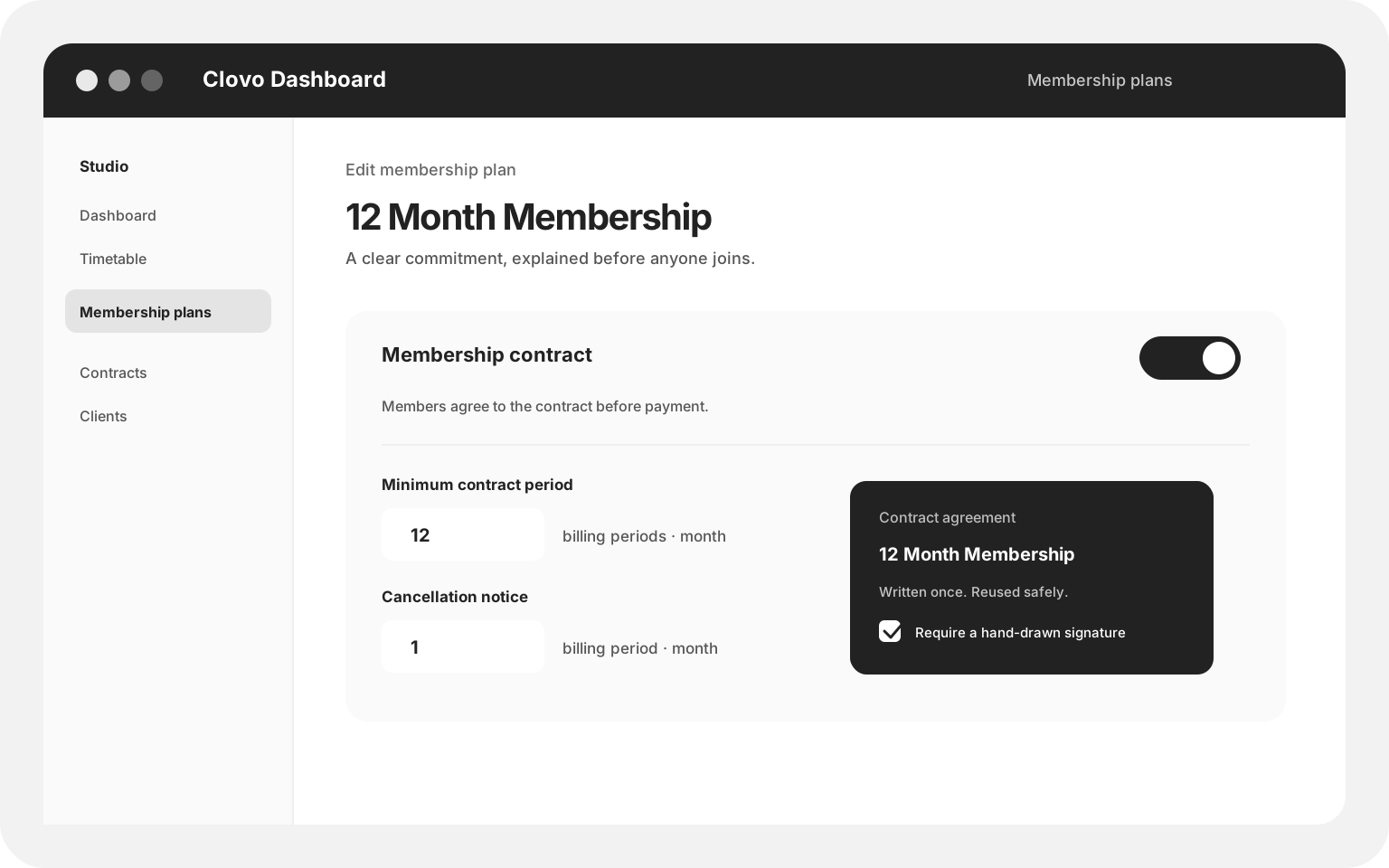
In the Dashboard, a studio can create a named membership contract with up to 20,000 characters of contract text. That contract can then be selected from a membership plan, alongside the plan’s price, billing period and class allowances. The Contracts area gives the team a useful operational view: which plans use each contract, how many active members have accepted it, and whether a drawn signature is part of the agreement.
Contract wording is intentionally treated as a record, not a live note. Once an agreement has been created, its text and signature requirement cannot be edited in place. If the studio needs different wording, it creates a new agreement and attaches that version to the relevant plan. This keeps the acceptance attached to the exact words and signature setting the member saw.

Creating a contract does not force a studio to use a signature pad. The agreement always includes an acceptance checkbox; the drawn signature is an additional requirement selected by the studio when it creates the agreement. That gives teams a simple path for a standard digital acceptance and a more formal path for plans where a signature on file is important.
Minimum periods are counted in billing periods
A minimum period is expressed in the plan’s own billing unit: weekly, fortnightly, monthly, quarterly, six-monthly or yearly. Set a yearly plan to 12 billing periods and Clovo understands that the member must reach the beginning of period 12 before a cancellation request can proceed. Set it to zero and the plan has no minimum term, even if the member still accepts a contract.
Notice periods make the end date predictable
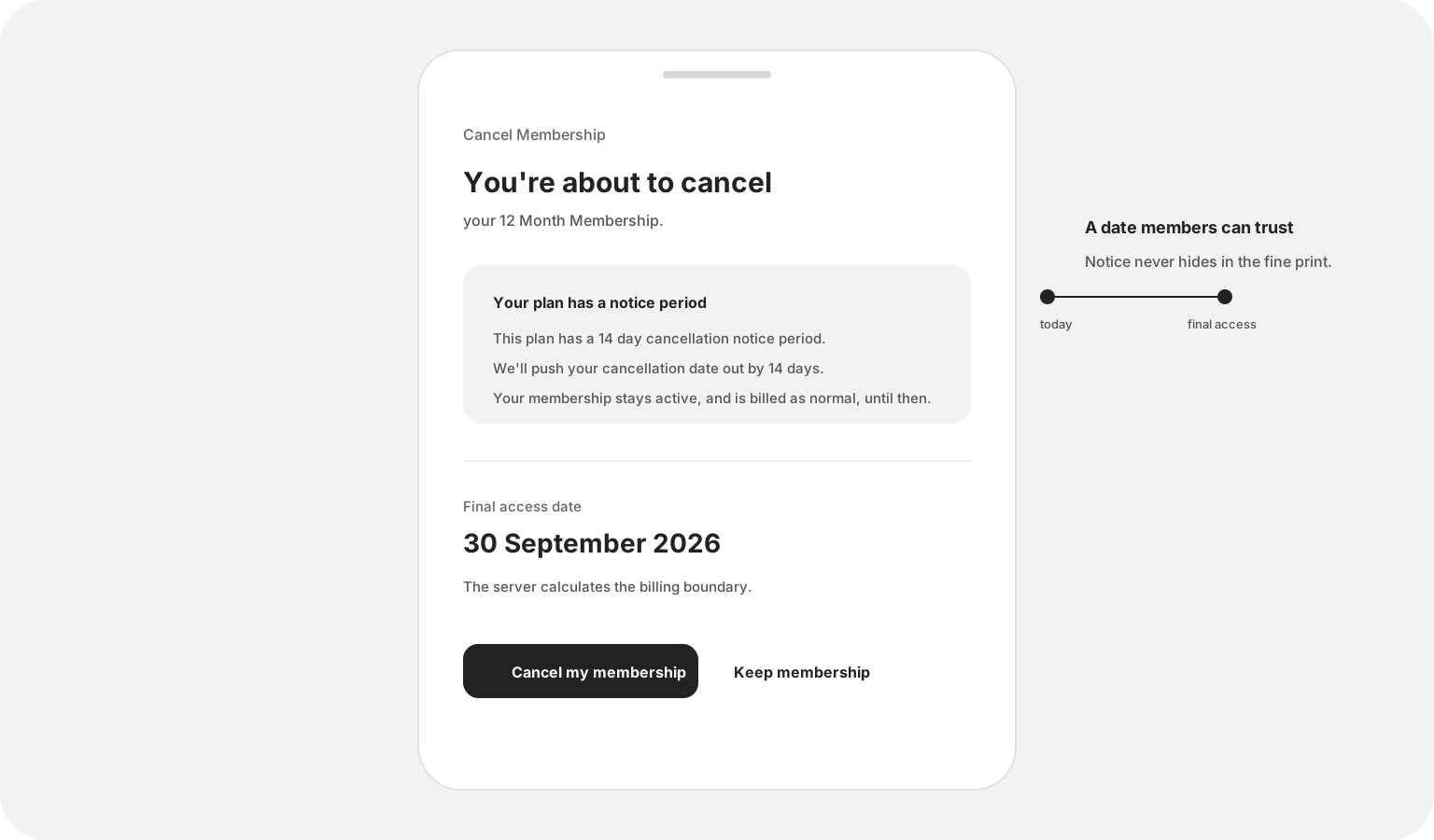
A notice period never silently cancels a membership today. It schedules the membership to end on a billing boundary after the current period and the configured notice periods have been served. A member can cancel the renewal now, keep access until the displayed final access date, and see that billing continues normally until then.
The internal calculation uses the plan’s actual billing periods, while the member-facing message is translated into days from the real dates. That means a monthly notice reads as the number of days it actually adds in that calendar month, not as a vague “one more period”. The cancellation preview is returned by the server to every client, so iOS and Android show the same policy outcome as the backend.
Every purchase surface asks for the same agreement
Contracts are most useful when they are part of the purchase, not a separate document someone has to remember to send. Clovo carries the same agreement into each place a membership can be purchased or assigned.
Public landing pages
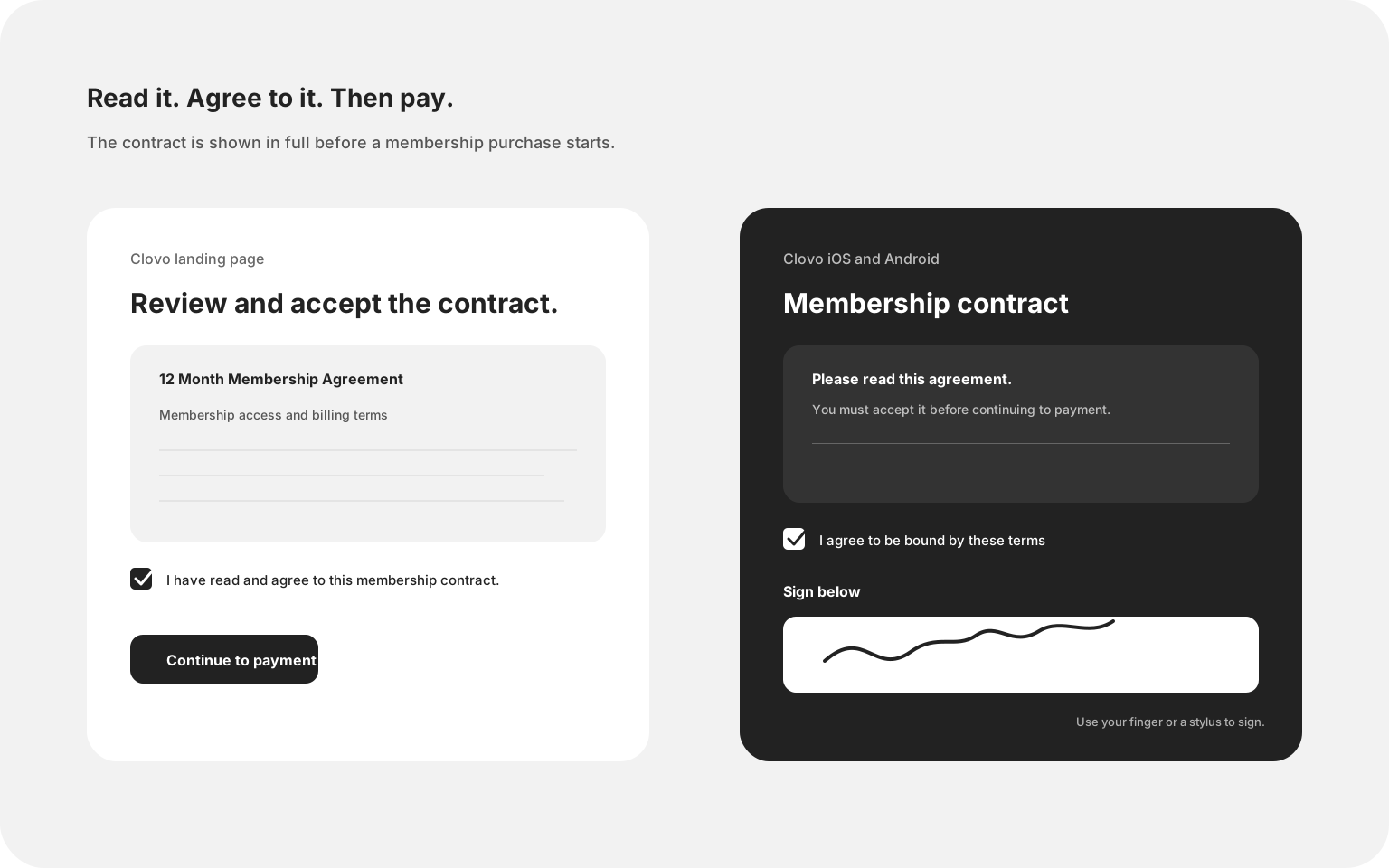
On a studio’s Clovo landing page, the member sees the full contract before payment. They tick “I have read and agree to this membership contract”, then continue to the Stripe payment step. If the studio requires a drawn signature, the signature pad appears in the same flow before payment begins.
The Dashboard and staff-assisted sales
When staff add a membership to an existing client, the plan picker identifies plans with contracts. The staff member can open the contract, show the client the wording and record the acceptance before moving on to payment. A paper-copy notice is available in the staff flow as a practical reminder that the client should receive a copy for their own records. If the contract asks for a drawn signature, the client signs on the staff-held screen.
Clovo iOS and Android
In the mobile apps, a plan carrying a contract opens a dedicated contract sheet before the payment sheet. The member can read the agreement in full, tick that they agree to be bound by the terms, and sign with a finger or stylus when the studio has requested it. The payment session is only prepared after the acceptance has been supplied, keeping the order clear: read, accept, then pay.
On iOS, the signature pad also respects the realities of assistive technology. A free-hand gesture is not a reasonable requirement for someone using VoiceOver or Switch Control, so the checkbox remains the valid acceptance path when drawing is not available. The server still records the source of the acceptance and whether signature data was supplied.
The record follows the membership
When a member accepts a contract, Clovo records the acceptance against the membership and the specific agreement. The record includes when it was accepted, where the acceptance came from, the request context available on that surface, and any normalised signature strokes. The Dashboard can then show the contract, its attached plans and the active members who have accepted it.
This also keeps payment and membership creation in the right order. The acceptance is captured before the payment session is taken, and a completed purchase carries that acceptance through to the membership record. If a contract is attached to a plan, the member cannot accidentally skip it by choosing a different device or by having staff complete the purchase on their behalf.
A better member conversation at cancellation time
Contracts should make expectations clearer, not turn cancellation into a dead end. That is why the cancellation experience distinguishes between a minimum term and notice. A minimum term can prevent cancellation until the required billing periods have begun. A notice period allows the cancellation request but moves the final access date forward. In both cases, Clovo tells the member what the plan is doing and why.
For studio teams, that means fewer manual date calculations and fewer awkward follow-up conversations. For members, it means the date they see in the app is the date the system will use. The rule is set once on the plan, enforced centrally, and explained at the moment it matters.
Contracts are now available in the Clovo Dashboard, Clovo landing pages, and the latest iOS and Android apps. Start setting up your studio and build membership plans with clearer commitments from the first purchase.