
Live schedule
Show upcoming classes
Display the timetable from your Clovo account on a WordPress page or post.

 Branded Booking Apps
Let clients book, pay and join waitlists in your branded app.
Branded Booking Apps
Let clients book, pay and join waitlists in your branded app.
 Studio Management Dashboard
Manage schedules, clients, payments and more in one place.
Studio Management Dashboard
Manage schedules, clients, payments and more in one place.
 Landing Pages
Showcase classes and pricing on your own .clovo.app page.
Landing Pages
Showcase classes and pricing on your own .clovo.app page.
 Member Shop
Sell studio merchandise through the app your members use.
Member Shop
Sell studio merchandise through the app your members use.
 Client Records
Keep progress notes, forms and agreements securely together.
Client Records
Keep progress notes, forms and agreements securely together.
 Integrated Admin App
Manage your studio from the Clovo app, wherever you are.
Integrated Admin App
Manage your studio from the Clovo app, wherever you are.
 Website Add-ons
Add live schedules and ways to buy to your existing website.
Website Add-ons
Add live schedules and ways to buy to your existing website.
 Retention
Spot clients drifting away and reconnect before they leave.
Retention
Spot clients drifting away and reconnect before they leave.
 Clovo Kiosk
Turn a spare iPad into self check-in and a studio showcase.
Clovo Kiosk
Turn a spare iPad into self check-in and a studio showcase.
 Growth
Grow your studio with reporting, offers, reviews and referrals.
Growth
Grow your studio with reporting, offers, reviews and referrals.
Bring your live timetable and plans to your WordPress website.
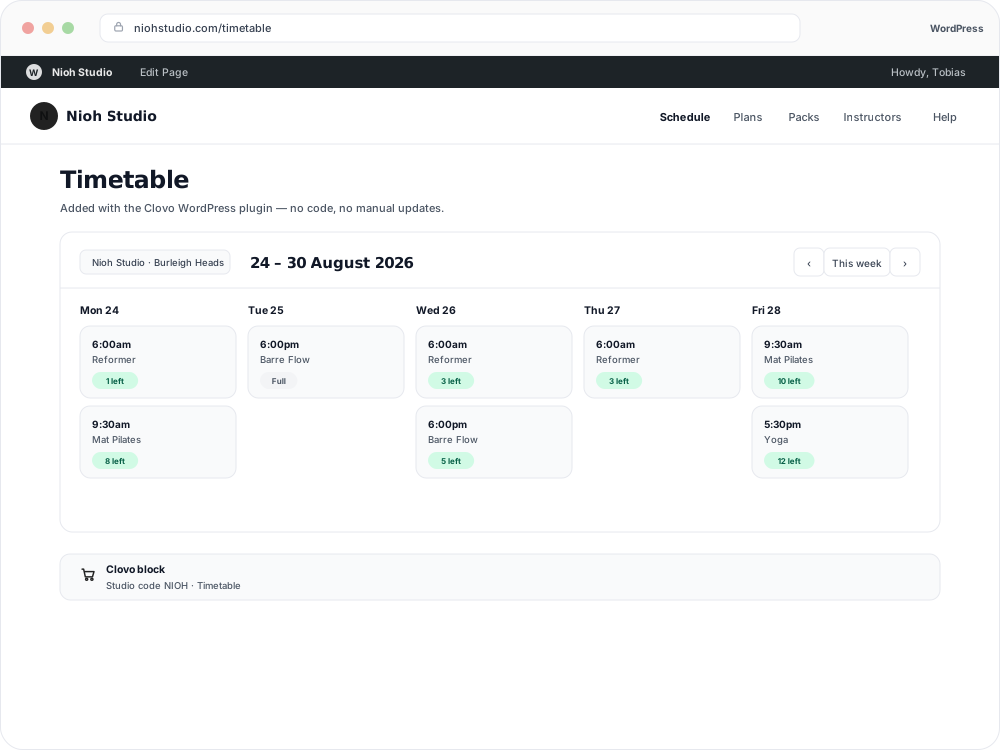
Update your classes and plans in Clovo and keep the information on your website current.
The Clovo WordPress Plugin places your studio’s timetable and product listings on your existing pages.
Live schedule
Display the timetable from your Clovo account on a WordPress page or post.
Your plans
Show memberships, credit packs and trials alongside your studio content.
Studio connection
Enter the Clovo Studio Code from Setup → Integrations into the plugin settings.
Your pages
Use the plugin’s provided shortcodes to embed your timetable and product listings.
Set up in Clovo
You’ll need a Clovo studio owner login and access to the service you’re connecting.
In WordPress, open Plugins → Add New, search for Clovo, then install and activate the plugin.
In Clovo, open Setup → Integrations and find your Clovo Studio Code.
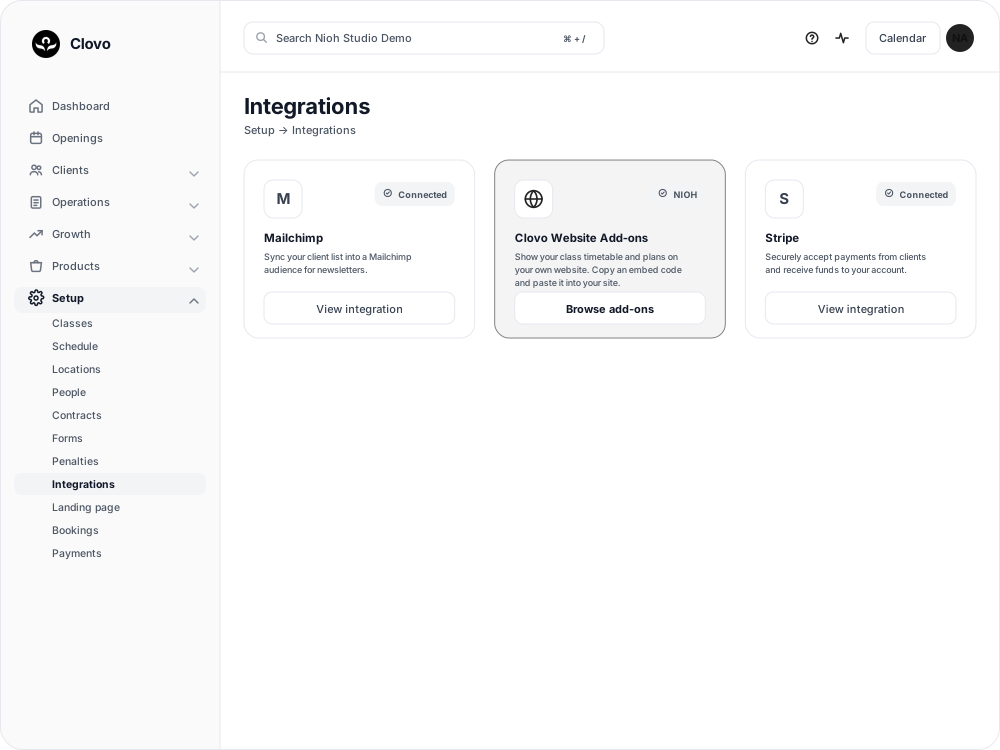
Enter the Studio Code in the Clovo plugin settings in WordPress.
Use the provided shortcodes in your WordPress page or post, then check the published page.
Yours to adjust
The embedded content uses live information from your Clovo account. Review the published page whenever you change its layout.
Common questions
Your live timetable and product listings, including memberships, credit packs and trials.
No. The embedded content pulls live information from Clovo, so changes to your studio schedule are reflected on your website.
Open Setup → Integrations in Clovo to find the code for your studio.
Yes. Clovo Website Add-ons also work on WordPress sites that allow you to paste embed code. Open Browse add-ons in Clovo to generate it.
Bring your live timetable and plans to your WordPress website.
New to Clovo? See how pricing works. Need a hand? Contact Clovo support. Read the WordPress setup guide.
Before connecting, read the Clovo privacy policy and terms of service.
WordPress and its associated names and logos belong to their respective owners. Third-party names and logos identify services Clovo works with and do not imply endorsement.
Launch your studio today with no monthly fee — you only pay when your members pay you. Set up for free, with no card required.
Start free today